The Telegraph UK Latest News
- 4.2
- Rating
- 500.00K
- Installs
- Free
- Price

 Analysis by App-foxy
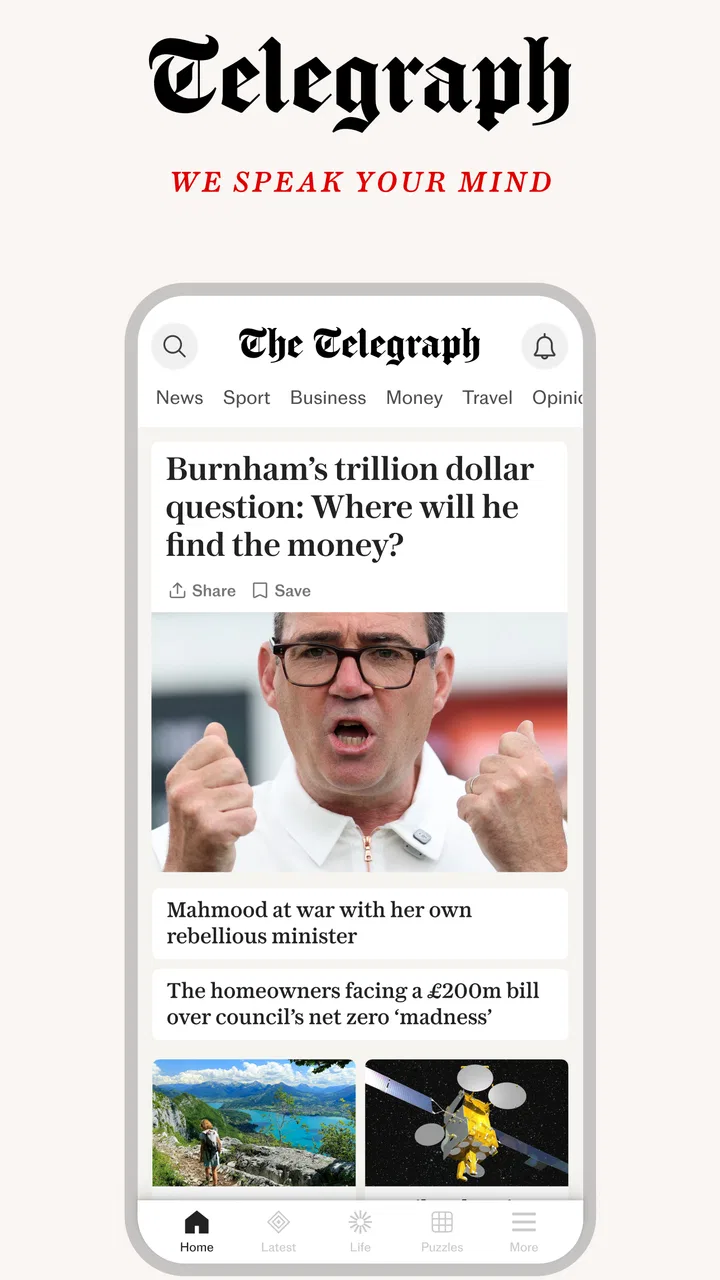
I found The Telegraph UK Latest News most useful when I treated it as a focused reading app rather than a general-purpose news feed. It brings together reporting from The Telegraph Media Group Holdings Limited across politics, business, finance, sport and wider daily news, with the Sunday magazine included in its newspaper-style offering. That mix gives it a clear identity: this is for readers who want a publication with a recognizable editorial voice, not an endless stream of unrelated headlines.
After spending time with it, my overall impression is positive but conditional. The app is free to install and suitable for everyone from an age-rating perspective, while some content or access can involve in-app purchases ranging from $1.49 to $119.99 per item. I would recommend trying it if you already enjoy The Telegraph’s coverage or prefer reading a newspaper digitally. I would be more cautious if you want a completely open news reader, a broad range of viewpoints in one place, or a reading experience with no subscription-related friction.
How the app handles readability and navigation
The strongest part of the experience is the publication-led structure. Instead of making every story compete equally for attention, the app presents The Telegraph as a daily newspaper and Sunday magazine. That approach is helpful when I want to browse by subject and then settle into a longer article. Politics, business, finance and sport are especially easy to understand as distinct reading areas, so I can move from the morning’s political story to market coverage without feeling as if I have left the publication’s main workflow.
You May Also Like

 Blood Strike: 2.5 Anniversary
Blood Strike’s Loadouts Turn Every Drop Into a Tactical Gamble
A close look at Blood Strike’s custom loadouts: how fast access to signature weapons reshapes its battle royale rhythm, rewards preparation, and narrows the gap between fights.

 Pandora - Music & Podcasts
Pandora’s Music Is Easy to Start, but Harder to Recover
Pandora’s strength is its low-effort path from a seed to a station. Its weak spot is how much confidence it asks you to place in connection, setup, and quiet recovery.

 8 Ball Pool
 Is Built on Rivalries, Rematches, and Routine
A close look at the rivalries, rematches, shared routines, and unanswered safety questions that turn a quick pool match into a persistent mobile community.

 Samsung Music
’s Quiet Strength Is Playing What You Already Own
Its reach comes less from spectacle than from dependable access to a personal library. That simplicity is both the app’s strongest retention engine and its ceiling.

 AccuWeather: Weather Radar
AccuWeather Review: A Quick, Clear Forecast for Everyday Decisions
For everyday plans, the best forecast is the one you can understand quickly. AccuWeather makes rain timing, radar, and local conditions easy to act on, with a few trade-offs.

 Hill Climb Racing
Why Hill Climb Racing Still Turns Crashes Into One More Run
A tiny car, a bumpy hill and one more upgrade: Hill Climb Racing keeps resurfacing because its simple chaos makes every near-miss feel personal.
More From Our News Desk



This is different from using a general news aggregator. An aggregator is usually better for scanning many sources quickly, comparing headlines or discovering a story from an unfamiliar publisher. The Telegraph app is better when I have already chosen the publication and want its reporting, presentation and regular sections in one place. That narrower purpose makes it feel less chaotic, although it also means I am not getting the same range of perspectives or source variety that a broad news app can provide.
I also like the newspaper mindset for deliberate reading. On a busy day, I can open the app, identify the section that matters most and leave the rest for later. The format encourages me to read beyond a single headline, which is useful for readers who want context rather than only short updates. For someone who prefers a rapid list of breaking stories, however, the editorial arrangement may feel slower than a simple chronological feed.
One practical habit improved my experience: I used the app as a morning briefing tool, then returned to it only when a subject genuinely deserved more time. That prevented the constant-refresh behavior common with social feeds. It also made the Sunday magazine element more valuable, because I approached it as longer weekend reading instead of expecting the same pace as daily news.
The current version is 5.23.1.1, and the app supports devices running Android 7.0 or later. That minimum requirement is relatively approachable for people who keep an older phone, although the actual comfort of reading will still depend on the handset’s screen, display settings and performance. The app has been available since October 2, 2013, and its established presence is reflected in its audience: it has passed 500 thousand installs, with an average rating of 4.2 from around 12 thousand ratings.
Those figures suggest that the app is familiar to a substantial group of readers, but I would not treat popularity as a guarantee that it will suit every reading style. News apps are personal tools. Someone who values a calm, publication-centered layout may appreciate it more than someone who wants instant comparison across broadcasters, newspapers and independent outlets.
Reading comfort depends on the device
For users with reduced vision, the most important question is not simply whether articles are available, but whether the whole route to an article remains comfortable. Headline density, spacing, contrast, image placement and the amount of scrolling all affect fatigue. I found that the app makes most sense on a screen large enough for sustained reading. A compact phone can still work for short checks, but longer political analysis or magazine pieces are more comfortable when I can enlarge the text through the device’s own settings and pause frequently.
I would advise testing a full article rather than judging the app from its front page. A busy section screen may be manageable for one person and tiring for another. If you rely on larger system text, display magnification or a particular contrast setting, install the app and read several paragraphs before deciding whether it belongs in your daily routine. That is a more reliable test than looking only at the headline layout.
People who are sensitive to visual clutter may prefer entering one section at a time instead of browsing everything at once. The app’s subject-based newspaper approach gives me a useful way to reduce the number of choices: I can go directly to sport, finance or politics and ignore the categories that are irrelevant that day. This is a small but meaningful advantage for readers who find large mixed feeds tiring.
Motor and sensory considerations in everyday use
News reading is often assumed to be an easy activity, but it can involve repeated taps, scrolling, back navigation and precise selection of small controls. That matters for anyone with limited dexterity, tremors, joint pain or temporary hand strain. I found the experience most comfortable when I slowed down and used a stable grip, particularly while moving between a section page and a long article. The app is easier to use for planned reading than for hurried one-handed browsing on a crowded commute.
A useful workaround is to choose the article first and then read in longer stretches, rather than repeatedly opening and closing short items. This reduces the number of precise gestures and makes the session more predictable. It is also kinder to users who find repeated tapping tiring. If you often read while carrying a bag, holding a child’s hand or standing on public transport, a general news feed with simpler rapid scanning may be less frustrating.
For readers with hearing loss, the core value of this app is naturally visual because its main purpose is written news and magazine reading. That makes it more suitable than an audio-first news service if you do not want spoken updates. At the same time, anyone expecting every story to be available in an equivalent non-visual format should check their own needs carefully before relying on it as their only news source. I would not assume that a text publication automatically provides a complete alternative for every sensory preference.
Users who experience migraines, light sensitivity or visual overload should pay attention to the phone’s display rather than only the app. Lowering brightness, using a warmer system display mode or taking breaks can make a bigger difference than changing news sections. Those adjustments are not special Telegraph features, but they are realistic ways to make a reading session less demanding.
People with dyslexia or other reading difficulties may appreciate being able to control the environment around the app through device-level text and display options, but the real test is the article typography on their own phone. I would try several types of coverage because a short news report and a dense finance article place different demands on reading speed and concentration. The app is most likely to work for readers who enjoy continuous prose; people who need highly simplified summaries may prefer a dedicated accessible news format.
When the setting changes the experience
At home, I found the app easiest to use for an intentional reading session. I could choose a section, adjust my screen and read without rushing. In that context, the newspaper format feels like a strength. It supports a routine: a quick scan of the main subjects, followed by deeper reading of the stories that matter.
On a commute, the balance changes. A phone screen, movement, glare and interruptions make long articles harder to follow. I would use it there for checking a few headlines or one important report, not for a complete Sunday magazine session. If you need news that works reliably in short, interrupted bursts, a more compact headline service may be a better companion.
For work, the business and finance coverage can be useful when I want to stay oriented without opening several unrelated apps. The trade-off is that a specialist financial service will usually be more appropriate for detailed market monitoring, while this app is better understood as newspaper coverage of those subjects. I would not use it as my sole tool for professional decisions, but it can fit well into a broader morning information routine.
For family use, the Everyone rating makes the app approachable from an age-classification standpoint. That does not mean every article will suit every child’s interests or reading level; news about politics, conflict or finance can still require adult judgment. I would let younger readers choose suitable sections with guidance rather than handing over the entire news environment without context.
Another realistic use is keeping a regular reader connected to a familiar publication after moving from print to a phone. The app preserves the idea of a daily newspaper while removing the need to carry a physical edition. That can be valuable for someone who likes established sections and editorial continuity but wants digital access. It is less compelling for a person who has never enjoyed newspaper-style reading and prefers short, algorithmically selected updates.
Where inclusive use still meets barriers
The biggest barrier is not the existence of news, but the relationship between access and payment. The app itself is free, yet in-app purchases can range from $1.49 to $119.99 per item. That wide range means a reader should pay attention to what is available without payment and what requires a purchase before building a routine around the app. For users with limited budgets, the uncertainty of a premium newspaper model may be more important than the installation cost.
This also affects shared devices and family planning. A household may be comfortable installing a free app but not with unexpected purchase prompts or a high-cost reading commitment. I would review the purchase flow carefully, use the device’s purchase protections and decide in advance whether the app is for occasional sampling or regular paid access. That simple step can prevent a mismatch between the word “free” and the actual way I want to use the publication.
Editorial focus is another limitation. The Telegraph app is not designed to be a neutral window onto every major news source. Its value comes from one publisher’s reporting and presentation. If you need to compare interpretations of the same event, you will need another app or browser alongside it. That is not a flaw in its identity, but it is an important accessibility issue in the broader sense: informed reading sometimes requires access to more than one viewpoint.
The app may also be a poor fit for users who need highly adjustable reading interfaces. I would not choose it solely on the assumption that a newspaper app will provide every text, contrast, navigation or assistive option I might need. The sensible approach is hands-on testing: open the app with your usual device settings, navigate to a section, enter a long article and check whether the controls remain comfortable. If that process is tiring, a simpler reader may serve you better.
Older devices are supported down to Android 7.0, which helps people who do not upgrade frequently. Still, operating-system compatibility is only one part of access. A device with a small display, limited storage, weak battery or slow performance can make a content-rich news app unpleasant even when it technically installs. I would leave enough room for the app and its normal operation, and I would avoid judging it while the phone is already struggling with several demanding tasks.
Who should choose it, and who should skip it?
I think it is a good choice for readers who want a recognizable British newspaper experience, regularly follow politics or sport, and enjoy moving from headlines into fuller articles. It also suits people who prefer a planned reading habit over an endlessly refreshing feed. The Sunday magazine angle gives weekend readers a reason to return beyond breaking news.
I would skip it if your priority is a single place for many publishers, highly compressed summaries, specialist financial tools or a completely free reading experience. I would also look elsewhere if you need a service built specifically around audio, simplified language or extensive interface customization. In those cases, a general aggregator, specialist finance app or accessibility-focused reader may be a better primary tool.
My most useful recommendation is to decide what role you want it to play before installing it. If you want one publication for a morning overview and occasional deep reading, it has a clear purpose. If you expect it to replace every news source, market tool and accessible reading service, disappointment is more likely. The app works best as one deliberate part of an information routine.
My inclusive verdict after using it
The Telegraph UK Latest News is strongest when readability means calm, purposeful newspaper reading rather than maximum customization. Its subject areas give me a clear route into politics, business, finance and sport, while the magazine format adds slower weekend reading. The established app, developed by Telegraph Media Group Holdings Limited, feels aimed at readers who value continuity and a defined editorial home.
Its inclusive qualities are practical rather than universal. A broad age rating, support for an older Android baseline and a visual reading format make it approachable for many people. The ability to choose a section and control the surrounding phone environment can also reduce clutter and fatigue. But motor comfort, text size, display sensitivity and assistive needs vary too much for me to promise the same experience to everyone.
I would start with the free installation, test a long article under my normal accessibility settings and pay close attention to any purchase requirements before committing. That workflow answers the questions that matter most: can I read comfortably, can I navigate without strain, and does the publication’s focused viewpoint suit me? If the answer is yes, this is a polished way to keep The Telegraph close at hand. If not, choosing a broader or more customizable news alternative would be the more inclusive decision.
For my own use, I would keep it for structured daily reading rather than constant alerts and rapid headline checking. It earns a place on the phone because it knows what kind of news experience it wants to provide. The important trade-off is accepting that focused identity, along with the payment model and the need to verify personal accessibility comfort. Readers who understand that balance are the ones most likely to find it worthwhile.
FAQs for The Telegraph UK Latest News
01What is The Telegraph UK Latest News app?
The Telegraph UK Latest News app is the mobile news platform from The Daily Telegraph, offering access to breaking news, politics, business, opinion, culture, sport, and lifestyle coverage. During testing, its layout was easy to browse, with a mixture of headline stories, topic sections, live updates, and in-depth articles designed for readers who want both quick updates and longer-form journalism.
02Is The Telegraph UK Latest News app free to download and use?
The app is generally free to download, but access to its full content may require a paid Telegraph subscription. Some articles or features can be available without payment, while premium stories, newsletters, digital editions, and other subscriber benefits may be restricted. Before downloading, users should check the current pricing, trial terms, and renewal conditions shown in the relevant Google Play Store or Apple App Store listing.
03What type of news and content can I read in the app?
The Telegraph UK Latest News app covers a broad range of subjects, including UK and international news, politics, finance, technology, travel, health, entertainment, sport, and lifestyle. It also includes analysis, opinion pieces, interviews, guides, and feature articles. This makes it suitable for readers seeking more context than a simple breaking-news feed, although the editorial style may not appeal to everyone.
04Does the app provide breaking-news alerts and personalised notifications?
Yes, the app can provide notifications for important or breaking stories, helping users keep up with major developments without constantly opening the application. Notification settings can usually be adjusted through the app or the device’s system settings, allowing readers to reduce alerts or focus on selected topics. Users should review these controls after installation because frequent news notifications may become distracting.
05Can I read articles offline or save them for later?
Offline reading and saving options may depend on the current version of the app and the user’s subscription level. Subscriber features can include access to digital content, saved articles, or editions that are downloaded for later use, while some functions may not be available to free users. It is worth checking the app’s account and download settings, especially if you plan to read while travelling without a reliable internet connection.
Pros
- Clear
- well-written reporting from a respected UK news organization.
- Excellent coverage of UK politics
- business
- culture
- and global events.
- Personalized alerts help you follow breaking stories and chosen topics.
- Digital editions and articles are easy to read on mobile devices.
- Includes puzzles and games that add value beyond the daily news.
Cons
- Many premium articles require an active subscription to access.
- Frequent notifications may feel excessive unless carefully customized.
- Some features and content may vary between app versions or regions.
- The app can use significant storage for downloaded editions and media.
- Opinions and editorial content may not suit readers seeking neutral reporting.

The Telegraph UK Latest News
Gallery